The Hope Group: Building AI Apps for Minority-Owned Small Businesses
The Hope Group builds opportunity-finding and busywork-killing infrastructure for the people who can't afford to build it themselves. Here's what we've shipped so far.
City of Boston Certified Small Business
Bid discovery for the trades
An AI that reads procurement portals so a small painting crew doesn't have to.
Watch a video demo of JEWN BUG
JEWN Enterprises is a Black-owned painting company owned by Nicole Wiggins of West Roxbury, working across residential, commercial, and municipal jobs throughout the Boston area. Strong crews and a steady reputation — but a steady stream of public and private bids was slipping past, simply because finding them was a full-time job nobody had time for.
JEWN BUG is built around a deceptively simple problem: the opportunities exist, but finding them is unpaid, full-time labor. The app continuously scans sixteen-plus municipal, state, and private procurement portals, pulls the real bid opportunities, and verifies that every link is live before it ever reaches Nicole — then files them into a saved-leads pipeline, drafts a first-pass bid on request, and syncs everything to Method CRM and QuickBooks. A contractor who used to lose work because nobody had time to go hunting now starts the morning with a vetted list.
None of that shape came from a spec. A big part of what I do is design research — sitting with a client and listening to how the work actually happens before deciding what to build. JEWN BUG looks the way it does because I watched where Nicole's time was leaking, not because I assumed what a "bid tool" ought to be.
I was lead designer, developer, and project manager on the project, which reached JEWN through a grant — Nicole received funding to work with us, so the entire engagement came at no cost to her business.
Design. I shaped the whole experience around a single daily habit — open the app, see what's new, act — and matched the look and tone to JEWN's own brand.
Development. I built the app end to end with Claude Code as my coding assistant — a React front end on a FastAPI back end. The Google Search–grounded Gemini API does the heavy lifting: searching for RFPs across the portals, parsing them, running the dual-confidence verification that discards any link it can't confirm is real, and powering the AI tools like the Proposal Writer. It rounds out with a saved-leads pipeline and sync into Method CRM and QuickBooks.
Project management. I scoped the work, ran the build sessions, handled delivery, and wrote the playbook so Nicole's team could run it without me in the loop.
JEWN BUG is live and in daily production use — part of Nicole's actual morning routine, surfacing real opportunities across sixteen-plus procurement portals.
City of Boston Woman-Owned Business
Workflow automation
Purchase orders arrive in a dozen formats. The app turns them into clean records — without anyone retyping a thing.
Unicorn — operating as Every Stall — is a Massachusetts-based women-owned distributor of period products, growing fast enough that the back office couldn't keep pace. During the project's design research phase, they stressed me out by taking me through their 19-step process for getting a single purchase order processed and distributed. We did not necessarily set out to make an app, but it ultimately was the approach we took. They are a truly innovative and organized team doing amazing work.
The Unicorn PO Dispenser tackles a bottleneck that gets worse the faster you grow: purchase orders arriving as PDFs, forwarded emails, and portal exports, each demanding manual re-entry into HubSpot, QuickBooks, Mainchain, and a shared billing inbox. The app reads each incoming PO with AI, extracts the company, line items, pricing, and addresses, and walks it through a review-and-approve flow into the downstream systems — turning a pile of mismatched documents into clean, tracked records without anyone retyping a thing.
The clearest measure of the work is the change in shape. A single purchase order used to pass through nineteen manual steps across multiple disconnected systems. In the app, it moves through four steps, with tight integrations between their platforms like HubSpot and QuickBooks, and the app acting as the orchestrator between them.
| # | Workflow step | Order |
PO |
PO Procure |
PO OrderStream |
Online Wix |
|---|---|---|---|---|---|---|
| 1 | Receive order request | ✓ | ✓ | – | – | – |
| 2 | Create quote with shipping | ✓ | ✓ | – | – | – |
| 3 | Receive final order docs | ✓ | ✓ | ✓ | ✓ | ✓ |
| 4 | Approve order in system | – | – | ✓ | ✓ | – |
| 5 | Open attachment / order details | ✓ | ✓ | ✓ | ✓ | ✓ |
| 6 | Validate pricing & shipping | ✓ | ✓ | ✓ | ✓ | – |
| 7 | Create deal in HubSpot | ✓ | ✓ | ✓ | ✓ | ✓ |
| 8 | Attach PO to deal | – | ✓ | ✓ | ✓ | – |
| 9 | Enter item lines | ✓ | ✓ | ✓ | ✓ | ✓ |
| 10 | Enter order properties | ✓ | ✓ | ✓ | ✓ | ✓ |
| 11 | Enter order # | ✓ | ✓ | ✓ | ✓ | ✓ |
| 12 | Place order in Mainchain | ✓ | ✓ | ✓ | ✓ | ✓ |
| 13 | Receive info from Mainfreight | ✓ | ✓ | ✓ | ✓ | ✓ |
| 14 | Reduce PO to 1 page | – | – | – | ✓ | – |
| 15 | Email PO to Mainfreight | – | – | – | ✓ | – |
| 16 | Email billing to Denielle | ✓ | ✓ | ✓ | ✓ | – |
| 17 | Generate invoice in QuickBooks | ✓ | ✓ | ✓ | ✓ | – |
| 18 | Send / submit tracking info | ✓ | ✓ | ✓ | ✓ | ✓ |
| 19 | Upload / enter invoice in portal | – | – | ✓ | ✓ | – |
Lead designer, developer, and project manager again, and again grant-funded — Every Stall secured a grant to work with us, so the build cost them nothing.
Design. I designed a four-view system — Dashboard, Inbox, AI Orders, and Pipeline — around one principle: the AI prepares, the operator decides. Nothing gets written to an external system without a human click.
Development. Utilizing Claude Code, Gemini APIs, and the sandbox feature of QuickBooks, I built the app on Google Cloud Run and Firebase Auth (admin / operator roles), and used AI to automatically fetch POs that get sent to an official email address and then to extract company, line items, pricing, and addresses. Then that data is spot-checked by a human before being synced via API to HubSpot and QuickBooks Online. I also built a seven-step Action Center that handles post-approval tasks with templates rather than extra AI calls, and designed the system to revolve around a kanban-style interactive interface so the users will always be able to track where an order is in the pipeline.
Project management. I scoped and sequenced the work across a series of over 20 build sessions, shipping iteratively and adjusting as the team's order volume grew and new ideas sprang forth during testing. I then created a standalone playbook deck and a built-in, detailed admin page and guide for the team — covering not only how to use the system most effectively, but how to use AI like I did to develop their own additional automations. The app is now being used in real business production.

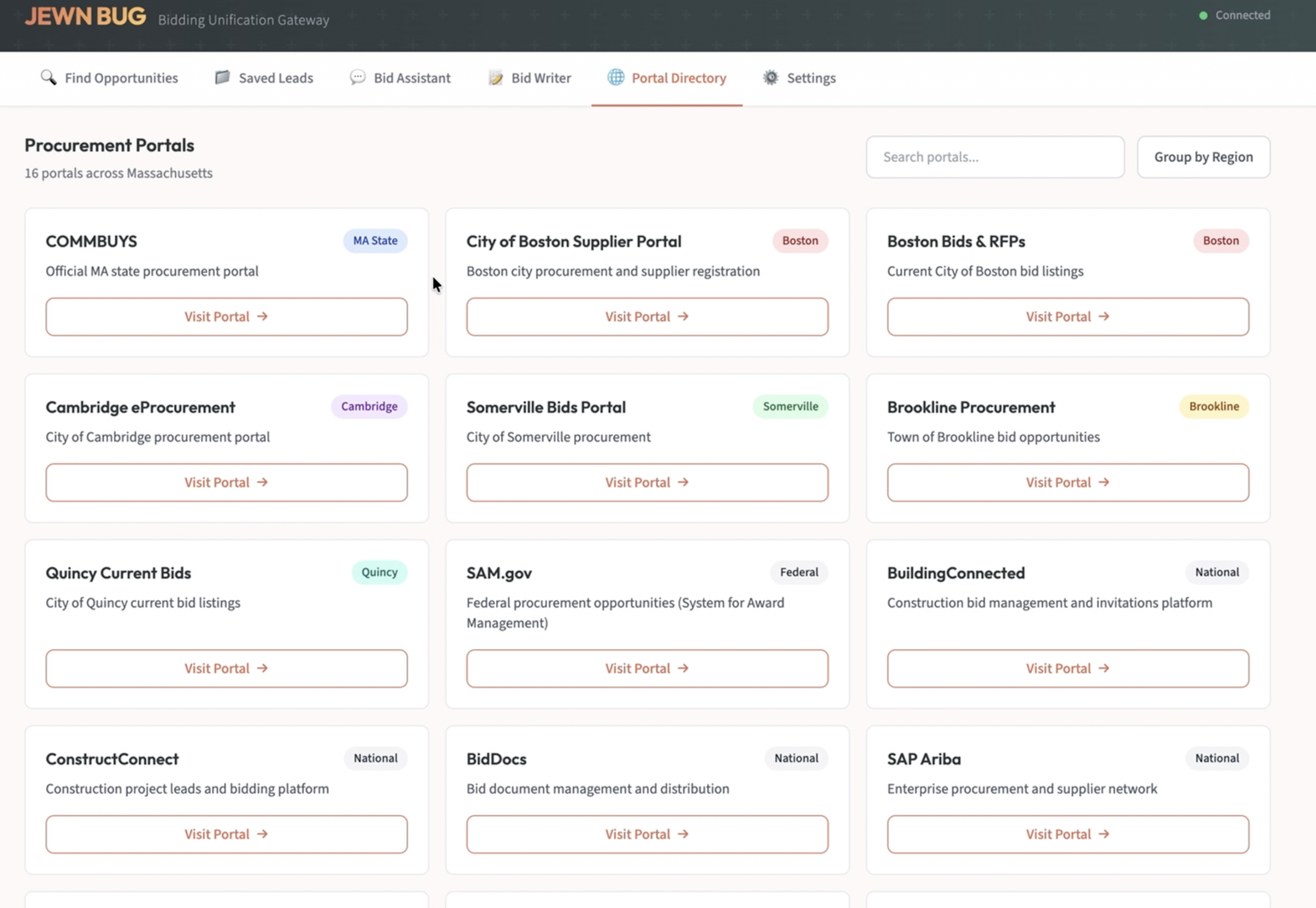
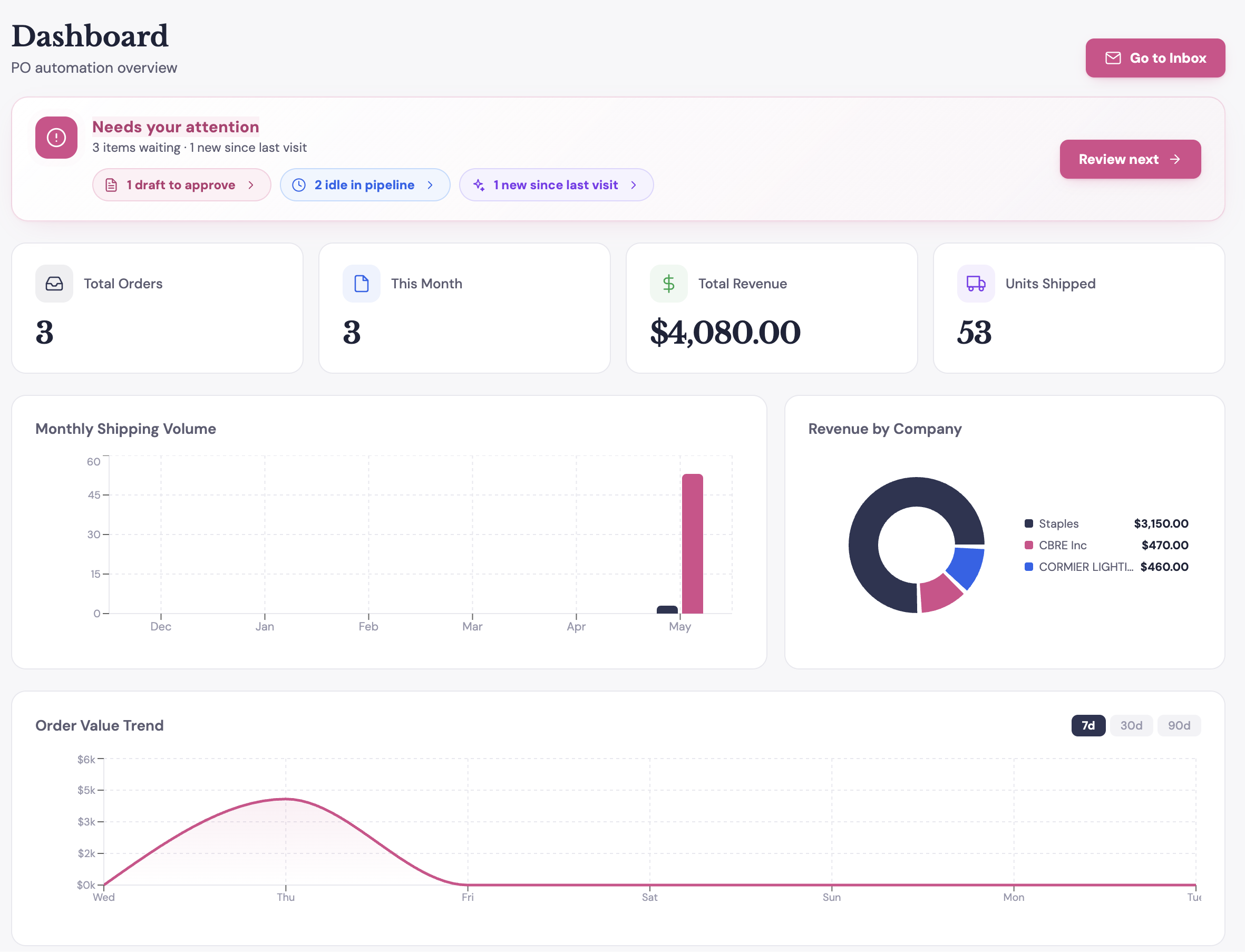

These are screenshots of the live platform
The Unicorn PO Dispenser is live in production, processing real purchase orders day to day and scaling alongside the business it was built to keep up with.